KinetiCore Temperature Data Acquisition System
Professional 36-Channel Thermocouple Logger
Product Overview
The KinetiCore Temperature Data Acquisition System is a complete, turnkey solution for high-precision multi-channel temperature monitoring. Combining industrial-grade hardware with intuitive software, this system delivers laboratory-quality temperature data logging in a compact, portable package.
Key Features
- ✅ 36 K-Type Thermocouple Inputs - Monitor up to 36 temperature points simultaneously
- ✅ Factory Calibrated - Pre-calibrated by KinetiCore with 1-year certification
- ✅ Plug-and-Play Operation - No configuration required, ready to log out of the box
- ✅ Professional Accuracy - ±0.5°C typical accuracy within calibrated range (0-100°C)
- ✅ Real-Time Monitoring - Live temperature display with customizable alerts
- ✅ CSV Data Export - Standard format compatible with Excel, MATLAB, Python
- ✅ High Reliability - Industrial NI-DAQmx hardware with optional high-durability logging
[!IMPORTANT]
CRITICAL WARNING: Calibration must be performed annually by KinetiCore Systems Inc. experts only. Users should NOT attempt to calibrate the device themselves.
System Specifications
Hardware Components
Data Acquisition Chassis
| Component |
Specification |
| Model |
National Instruments cDAQ-9174 |
| Type |
4-slot CompactDAQ USB chassis |
| Communication |
USB 2.0 (Type-A to device) |
| Power |
110V AC, 50/60 Hz |
| Dimensions |
Compact form factor (enclosure-mounted) |
| Module |
Channels |
Type |
Resolution |
Sample Rate |
| NI-9213 (×2) |
16 each (32 total) |
K-Type TC |
24-bit |
Up to 75 S/s aggregate |
| NI-9211 (×1) |
4 |
K-Type TC |
24-bit |
Up to 14 S/s per channel |
| Total Channels |
36 |
K-Type only |
24-bit |
Configurable |
Connector Panel
| Component |
Specification |
| Manufacturer |
Omega Engineering |
| Inputs |
36 K-Type thermocouple jacks |
| Connector Types |
Miniature & Standard female jacks |
| Panel Material |
Industrial-grade enclosure-mounted |
| Color Coding |
Standard K-Type (Yellow) |
Measurement Specifications
| Parameter |
Value |
| Temperature Range |
-200°C to +1250°C |
| Thermocouple Type |
K-Type (Chromel-Alumel) |
| Resolution |
0.02°C (24-bit) |
| Accuracy (uncalibrated) |
±2.2°C typical (NI module specification) |
| Accuracy (calibrated, 0-100°C) |
±0.5°C typical (with KinetiCore 3-point calibration) |
| Accuracy (outside calibrated range) |
±2.2°C typical (NI module specification) |
| Cold Junction Compensation |
Automatic (on-board CJC sensors) |
| Sampling Rate |
0.5 to 2.0 Hz (user configurable) |
| Isolation |
Channel-to-bus isolation per NI specifications |
Software Features
KinetiCore Logger Application
- Platform: Windows 10/11 (64-bit)
- User Interface: PyQt6-based graphical interface
- Data Format: CSV (timestamped rows)
- Real-Time Display: Live plotting with 300-point scrolling window
- Channel Management: Individual channel enable/disable, custom channel naming, configurable grid layout (1-12 columns), color-coded threshold alerts
- Quality Modes: Speed (fast logging, minimal filtering), Balanced (standard performance, default), Accuracy (maximum precision with noise filtering)
- Data Protection: High Durability mode with fsync (crash-safe logging), configurable batch sizes and flush intervals
- Statistics: Real-time min/max/average per channel
- Comments: Add timestamped annotations during logging
- History Viewer: Load and plot historical CSV files
- Access: Restricted to authorized KinetiCore personnel
- Method: Two-point linear calibration (ice bath + hot reference)
- File Protection: SHA256 checksum validation, read-only enforcement
- Calibration Storage: Encrypted JSON with tamper detection
- Validity: 1-year certification from calibration date
Physical Configuration
Enclosure Layout
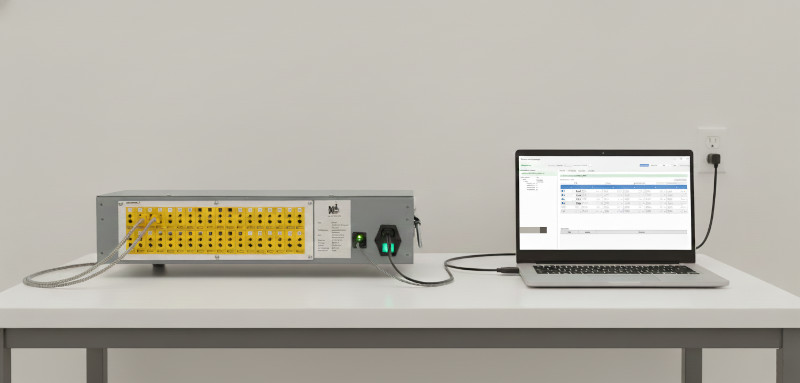
Enclosure Specifications
- Material: Industrial-grade metal/plastic composite
- Mounting: Desktop/portable configuration
- Cooling: Passive ventilation (no fans)
- Weight: Approximately 3-5 kg (with modules)
- Dimensions: Custom enclosure sized for cDAQ-9174 + modules
Quick Start Guide
Step 1: Physical Setup
- Connect Thermocouples
- Plug K-Type thermocouples into Omega panel jacks
- Observe polarity (Yellow = positive for K-Type)
- Miniature or standard connectors accepted
-
Label channels 1-36 as needed
-
Power Connection
- Plug enclosure into 110V AC outlet
-
Verify power LED illuminates
-
USB Connection
- Connect USB Type-A cable from enclosure to computer
- Wait for Windows to recognize NI-DAQmx hardware
- Verify USB connection LED illuminates
Step 2: Software Installation
Prerequisites (installed by KinetiCore):
- Windows 10 or 11 (64-bit)
- National Instruments NI-DAQmx Runtime (latest version)
- KinetiCore Logger Application
Note: System is delivered pre-configured. No driver installation required by end user.
Step 3: Start Logging
-
Launch Application
Desktop shortcut: "KinetiCore Logger"
   or
   Start Menu → KinetiCore → Temperature Logger
-
Scan for Devices
- Click "Scan Devices" button
- System detects cDAQ-9174 and all 36 channels
-
Channel grid populates automatically
-
Configure Settings
- Interval: Set sampling rate (default: 1.0 second)
- Quality Mode: Choose Speed/Balanced/Accuracy
- High Durability: Enable for critical experiments (optional)
-
Select channels to monitor (check/uncheck boxes)
-
Start Data Collection
- Click "Start Logging"
- Choose file name and save location
- CSV file begins recording immediately
-
Live plot displays selected channels
-
Monitor and Annotate
- View real-time temperatures on plot
- Add comments using 💬 button
- Set threshold alerts (⚠ Set Thresholds)
-
Statistics auto-update (min/max/avg)
-
Stop Logging
- Click "Stop Logging" when complete
- CSV file saved automatically
- Data preserved with high durability mode
CSV File Structure
Timestamp,Ch1,Ch2,Ch3,...,Ch36
2025-11-24 14:30:00,23.5,24.1,25.0,...,22.8
2025-11-24 14:30:01,23.6,24.1,25.1,...,22.9
2025-11-24 14:30:02,23.7,24.2,25.2,...,23.0
File Organization
Each logging session creates two files:
{filename}.csv - Temperature data with timestamps{filename}_comments.json - User annotations
Example:
D:\Data\
├── experiment_001.csv
├── experiment_001_comments.json
├── experiment_002.csv
└── experiment_002_comments.json
Calibration Service
Factory Calibration
Every KinetiCore system is calibrated before delivery
Calibration Certificate included with each system:
- Serial number
- Calibration date
- Individual channel coefficients (slope + offset)
- Traceability information
Calibration Validity
- Duration: 1 year from calibration date, Annual recalibration required and should be performed by KinetiCore System Inc.
Recalibration Process
When to Return for Recalibration:
- 1 year has elapsed since last calibration
- System shows drift (ice bath test ≠ 0.0°C)
- After physical damage or sensor replacement
- Regulatory/quality requirements
Return Procedure:
- Contact KinetiCore Support: info@kineticore.com
- Receive RMA (Return Merchandise Authorization) number
- Ship system to KinetiCore facility
- System recalibrated within 5 business days
- Updated calibration certificate provided
- Return shipping included
Recalibration Cost: Contact KinetiCore for current pricing
Technical Support
KinetiCore Support
- Email: info@kineticore.com
- Phone: +1 (604) 618-6411
- Hours: Monday-Friday, 8:00 AM - 4:00 PM PT
Self-Service Resources
- User Manual:
USER_MANUAL.html (included with software)
- Software Updates: www.kineticore.com/downloads
Troubleshooting
| Issue |
Solution |
| No channels detected |
1. Verify USB connection
2. Check 110V power
3. Restart NI-DAQmx service |
| Readings show "--" |
1. Check thermocouple connections
2. Verify polarity
3. Test with known-good TC |
| Inaccurate readings |
1. Perform ice bath test (should read 0.0°C)
2. Contact KinetiCore if drift > ±2°C |
| Software won't start |
1. Verify NI-DAQmx drivers installed
2. Run as Administrator
3. Reinstall application |
Regulatory & Compliance
Standards Compliance
- NI-DAQmx Hardware: CE, FCC Part 15 Class A, RoHS compliant
- Thermocouple Standard: ASTM E230 (K-Type)
- Data Integrity: ISO 9001:2015 compliant procedures
⚠️ Warnings:
- Connect only to grounded 110V AC outlets
- Do not operate in explosive or flammable atmospheres
- Thermocouples can measure high temperatures - handle with caution
- Do not open enclosure - no user-serviceable parts inside
Environmental Conditions
| Parameter |
Operating |
Storage |
| Temperature |
0°C to 50°C |
-20°C to 70°C |
| Humidity |
10% to 90% RH (non-condensing) |
5% to 95% RH |
| Altitude |
Up to 2000m |
Up to 3000m |
Warranty & Service
Standard Warranty
- Hardware: 1 year from date of purchase
- Software: Lifetime updates for registered users
- Calibration: 1 year validity (annual recal required)
Warranty Coverage:
- Manufacturing defects
- Component failures under normal use
- Firmware/software bugs
Not Covered:
- Physical damage or misuse
- Thermocouple wear (consumable items)
- Calibration drift beyond 1 year
- Unauthorized modifications
Extended Service Plans
Available Options:
- Annual Calibration Plan: Automatic yearly recalibration with prepaid shipping
- Extended Warranty: 3-year hardware coverage
- Priority Support: 4-hour response time, phone support
Contact KinetiCore Sales for pricing: info@kineticore.com
Accessories & Consumables
Recommended Accessories
| Item |
Part Number |
Description |
| K-Type Thermocouples |
TC-K-36-SET |
Set of 36 thermocouples with mini connectors |
| Spare USB Cable |
USB-AB-6FT |
USB 2.0 Type-A to device, 6 ft |
| Power Cable |
PWR-110V-US |
Replacement 110V AC power cord (US) |
Consumables
- Thermocouples: Expected life 2-5 years (depends on application)
- Connector Contacts: Periodically inspect for corrosion/wear
Product SKU
KTC-DAQ-36CH-K - KinetiCore 36-Channel K-Type Temperature Data Acquisition System
Includes:
- ✅ Custom enclosure with cDAQ-9174, NI-9213 (×2), NI-9211 (×1)
- ✅ Omega 36-channel thermocouple panel (miniature + standard jacks)
- ✅ USB cable (6 ft)
- ✅ 110V AC power cable
- ✅ KinetiCore Logger software (pre-installed or download link)
- ✅ Factory calibration certificate (1-year validity)
- ✅ User manual and quick start guide
- ✅ 1-year hardware warranty
Optional Add-Ons:
- 36× K-Type thermocouples with connectors
- Extended calibration plan (multi-year)
- On-site installation and training
KinetiCore Systems Inc
- Support: info@kineticore.com | 604-618-6411
- Website: www.kineticore.com
- Address: 216 6th St E. North Vancouver, BC, V7L1P5
Appendix
Channel Mapping
| Hardware Module |
Channel Range |
Omega Panel Position |
| NI-9213 #1 (Mod1) |
Ch 1-16 |
No 1 to 16 |
| NI-9213 #2 (Mod2) |
Ch 17-32 |
No 17 - 32 |
| NI-9211 (Mod3) |
Ch 33-36 |
No 33 to 36 |
Quality Modes Explained
| Mode |
Buffer |
Timeout |
Use Case |
| Speed |
20× rate |
0.05s |
High-speed transient monitoring |
| Balanced |
10× rate |
0.1s |
General-purpose logging (default) |
| Accuracy |
5× rate |
0.2s |
Precision measurements with noise filtering |
Document Version: 1.6.1
Last Updated: December 15, 2025
Part Number: DOC-KTC-DAQ-36CH-DS
© 2025 KinetiCore Systems Inc. All rights reserved.
Specifications subject to change without notice.
National Instruments, NI, cDAQ, and CompactDAQ are trademarks of National Instruments Corporation.
Omega is a registered trademark of Omega Engineering, Inc.